Skip to content
Resources
Data

skills your team

will use on Monday.

From Excel basics to machine learning. We start where your team is today, and every level teaches how to use AI in the work.

  • Virtual
  • In-person
  • Hybrid
  • Half-day to 12 weeks

Trusted by data teams at

Bank Indonesia
BNI
BRI
Mandiri
OJK
Kementerian Keuangan
Pertamina
Zurich
KAI Commuter

Why we train differently

Most data training teaches tools. We train for business results.

  1. What usually goes wrong

    Skills without a business purpose

    Most trainers teach Excel, SQL or Power BI as tools. Participants learn the buttons, but not how it changes a decision or a number the business cares about.

    How we train

    Start from the business result

    Before the class, we agree with you which reports, decisions or targets the training should improve. Every module is built toward that.

  2. What usually goes wrong

    One class for every level

    The same material goes to everyone. Analysts find it too easy, others find it too hard, and nobody changes how they work.

    How we train

    Discovery first

    We meet your team and run a quick skills check. The program is then set at the level your people are actually at.

  3. What usually goes wrong

    Examples from someone else's company

    Participants practise on made-up data from other industries, so it's hard to use what they learned in their own work.

    How we train

    Built around your company

    Exercises use your own data (with sensitive details hidden), your tools and cases from your industry. Each participant finishes with a report or dashboard their team can use.

  4. What usually goes wrong

    Learning stops when the class ends

    Without follow-up, people go back to old habits within weeks.

    How we train

    Support after the class

    Our coaches keep helping after the class ends. Teams can also present what they built to management.

Your tools

Whatever tools you use, we train on them.

Most teams use several of these. In discovery we note which ones your team uses, and all practice happens there.

Spreadsheets

Excel Power Query VBA / Macro Google Sheets

Databases & SQL

BigQuery PostgreSQL SQL Server MySQL

BI & dashboards

Power BI Tableau Looker Studio Looker Qlik Metabase

Programming & machine learning

Jupyter pandas scikit-learn Git

AI assistants

Copilot in Excel Copilot in Power BI Tableau AI Gemini in Sheets Gemini in Looker Gemini in BigQuery ChatGPT Claude

Work in banking, insurance or government? We can hide sensitive data or train inside your own systems, following your security rules.

Coverage

Four levels, with AI in each one.

Levels are set by who is learning, not by tool. Each one has a core skill, the AI that goes with it, and something your team takes back to work.

  1. Level 1

    Data Basics

    Any staff or manager

    They finish with

    A one-page summary of your team's key numbers

    Taught on

    • Excel
    • Google Sheets
    • Copilot
    • Gemini

    What they learn:

    • Read reports and dashboards
    • Analyse data in Excel
    • Explain findings clearly

    With AI

    Use Copilot or Gemini to tidy, summarise and explain data

    Download syllabus : Level 1 Data Basics
  2. Level 2

    Business Analytics

    Staff who prepare reports

    They finish with

    A working dashboard built on your data

    Taught on

    • BigQuery
    • SQL Server
    • Power BI
    • Tableau

    What they learn:

    • Pull data from databases with SQL
    • Build dashboards in Power BI or Tableau
    • Make clear charts

    With AI

    Let AI write database queries and draft report summaries

    Download syllabus : Level 2 Business Analytics
  3. Level 3

    Advanced Analytics

    Experienced analysts

    They finish with

    A sales forecast or customer grouping

    Taught on

    • Jupyter
    • pandas

    What they learn:

    • Analyse data with Python
    • Forecast future numbers
    • Group customers
    • Test which option works better

    With AI

    Use AI to write and check Python code

    Download syllabus : Level 3 Advanced Analytics
  4. Level 4

    Data Science

    Data and IT teams

    They finish with

    A tested prediction model

    Taught on

    • Jupyter
    • scikit-learn
    • Git

    What they learn:

    • Build and test prediction models
    • Put models to work in the business

    With AI

    Build AI tools that answer questions from your company's own data

    Download syllabus : Level 4 Data Science
Short option

AI for Data · 1–2 days for teams who already use SQL or dashboards. Build an AI assistant that analyses your own reports.

See AI Training

With universities

University programs with a certificate

Joint programs with Indonesian universities, for teams ready to go past the ladder with a university certificate.

ITB Institut Teknologi Bandung
Leaders

Data-Driven & AI Decision Making for Leaders

12 weeks, online plus sessions at ITB Bandung. For managers. December 2026 class open.

Explore the program
BINUS University BINUS University
After Level 2

Applied AI, Analytics & Automation

12 weeks, online plus sessions at BINUS Kemanggisan.

Explore the program
ITB Institut Teknologi Bandung
After Level 3

Applied Data Science with AI

13 weeks, online plus sessions at ITB campus. For analysts moving into predictive modelling. December 2026 cohort.

Explore the program

Who teaches

Taught by people who do this work every day.

Our instructors are working data practitioners at banks, tech companies and consumer brands in Indonesia.

We match instructors to your team's industry and level during discovery, and confirm them before the class starts.

Results

Don't take our word for it.

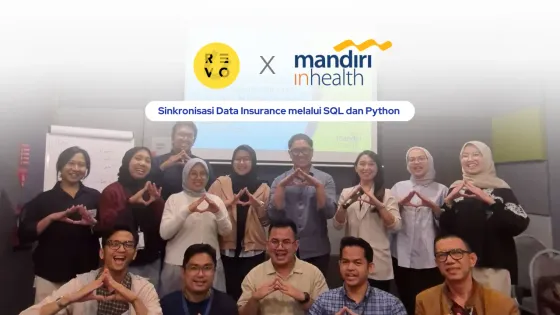
Mandiri Inhealth team after a RevoU data training session
Insurance · Mandiri Inhealth

Made actuarial reporting faster and more consistent using SQL, Python and Power BI.

Read case study
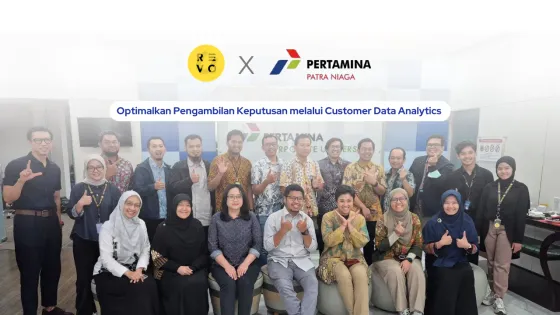
Pertamina Patra Niaga team after a RevoU data training session
Energy · Pertamina Patra Niaga

Taught the team to analyse customer data, with help from AI.

Read case study
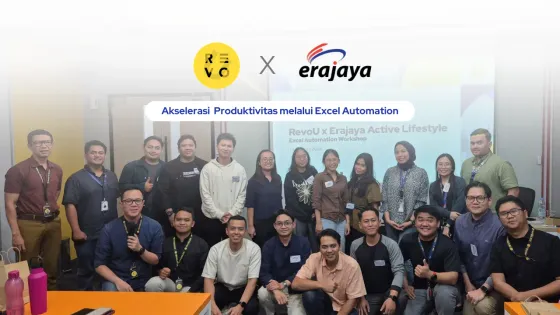
Erajaya team at a RevoU Excel automation workshop
Retail · Erajaya

Automated repetitive Excel reports with macros.

Read case study

Want AI across every function, not just data?

AI Training covers Marketing, Sales, HR, Finance and more. AI Transformation helps you change how the work itself gets done.

FAQ

Common questions

Our team has people at different levels. How do you handle that?

We start with discovery: a quick skills check and a conversation with the team lead. People are then grouped by level, so analysts and non-analysts don't sit through the same material. A mixed team usually ends up across two levels, run as separate groups.

Can we use our own data, and how do you keep it confidential?

Yes. Exercises use your own reports and data, with sensitive details hidden before the class. For banking, insurance and government teams we can also train inside your own systems, following your security rules.

Which tools do you teach, and do we need to buy new software?

We teach on the tools you already have: Excel, Google Sheets, SQL databases, Power BI, Tableau, Looker Studio, Python and the AI assistants built into them. You don't need to buy new software. If a tool is worth adding, we'll say so and explain why.

How long does each level take?

It depends on the level and how deep your team needs to go. Programs run from a half-day workshop to multi-week tracks, and the university programs run 12 weeks. We confirm hours and schedule after discovery.

Do participants get a certificate?

Yes. Participants who complete the program receive a RevoU certificate. The ITB and BINUS programs come with a university certificate.

How do we measure whether the training worked?

Before the class we agree which reports, decisions or targets the training should improve. Each participant finishes with a real output built on your data (a summary, a dashboard, a forecast or a model), and teams can present it to management. Whether that output is still in use afterwards is how we measure it.

Talk to Our Team

Tell us what you're looking for. We'll follow up within one business day.

Get in Touch